Prototype Design Pattern
Prototype Pattern says that cloning of an existing object instead of creating new one and can also be customized as per the requirement.
This pattern should be followed, if the cost of creating a new object is expensive and resource intensive.
Advantage of Prototype Pattern
The main advantages of prototype pattern are as follows:
- It reduces the need of sub-classing.
- It hides complexities of creating objects.
- The clients can get new objects without knowing which type of object it will be.
- It lets you add or remove objects at runtime.
Usage of Prototype Pattern
- When the classes are instantiated at runtime.
- When the cost of creating an object is expensive or complicated.
- When you want to keep the number of classes in an application minimum.
- When the client application needs to be unaware of object creation and representation.
UML for Prototype Pattern
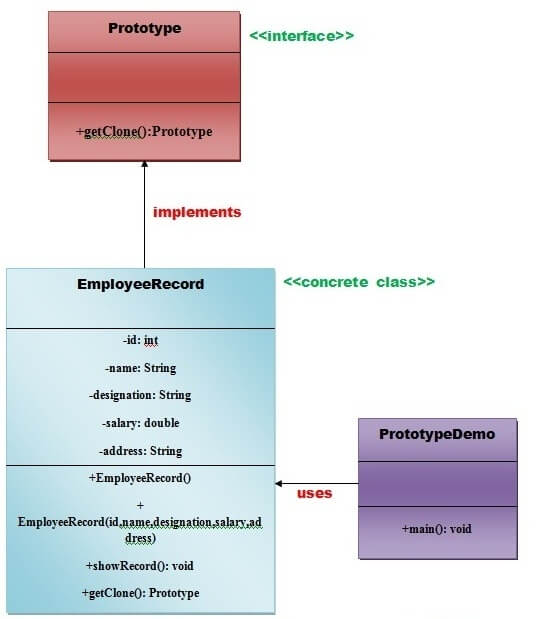
- We are going to create an interface Prototype that contains a method getClone() of Prototype type.
- Then, we create a concrete class EmployeeRecord which implements Prototype interface that does the cloning of EmployeeRecord object.
- PrototypeDemo class will uses this concrete class EmployeeRecord.
Example of Prototype Design Pattern
Let’s see the example of prototype design pattern.
interface Prototype {
public Prototype getClone();
}//End of Prototype interface.
class EmployeeRecord implements Prototype {
privateintid;
private String name, designation;
privatedoublesalary;
privateString address;
public EmployeeRecord() {
System.out.println(” Employee Records of Oracle Corporation “);
System.out.println(“———————————————“);
System.out.println(“Eid” + “\t” + “Ename” + “\t” + “Edesignation” + “\t” + “Esalary” + “\t\t” + “Eaddress”);
}
public EmployeeRecord(int id, String name, String designation, double salary, String address) {
this();
this.id = id;
this.name = name;
this.designation = designation;
this.salary = salary;
this.address = address;
}
publicvoidshowRecord() {
System.out.println(id + “\t” + name + “\t” + designation + “\t” + salary + “\t” + address);
}
@Override
public Prototype getClone() {
return new EmployeeRecord(id, name, designation, salary, address);
}
}// End of EmployeeRecord class.
import java.io.BufferedReader;
import java.io.IOException;
import java.io.InputStreamReader;
class PrototypeDemo {
publicstaticvoidmain(String[] args) throws IOException {
BufferedReader br = new BufferedReader(new InputStreamReader(System.in));
System.out.print(“Enter Employee Id: “);
int eid = Integer.parseInt(br.readLine());
System.out.print(“\n”);
System.out.print(“Enter Employee Name: “);
String ename = br.readLine();
System.out.print(“\n”);
System.out.print(“Enter Employee Designation: “);
String edesignation = br.readLine();
System.out.print(“\n”);
System.out.print(“Enter Employee Address: “);
String eaddress = br.readLine();
System.out.print(“\n”);
System.out.print(“Enter Employee Salary: “);
double esalary = Double.parseDouble(br.readLine());
System.out.print(“\n”);
EmployeeRecord e1 = new EmployeeRecord(eid, ename, edesignation, esalary, eaddress);
e1.showRecord();
System.out.println(“\n”);
EmployeeRecord e2 = (EmployeeRecord) e1.getClone();
e2.showRecord();
}
}// End of the ProtoypeDemo class.

