Decorator Pattern
Decorator Pattern
A Decorator Pattern says that just “attach a flexible additional responsibilities to an object dynamically”.
In other words, The Decorator Pattern uses composition instead of inheritance to extend the functionality of an object at runtime.
The Decorator Pattern is also known as Wrapper.
Advantage of Decorator Pattern
- It provides greater flexibility than static inheritance.
- It enhances the extensibility of the object, because changes are made by coding new classes.
- It simplifies the coding by allowing you to develop a series of functionality from targeted classes instead of coding all of the behavior into the object.
Usage of Decorator Pattern
It is used:
- When you want to transparently and dynamically add responsibilities to objects without affecting other objects.
- When you want to add responsibilities to an object that you may want to change in future.
- Extending functionality by sub-classing is no longer practical.
UML for Decorator Pattern:
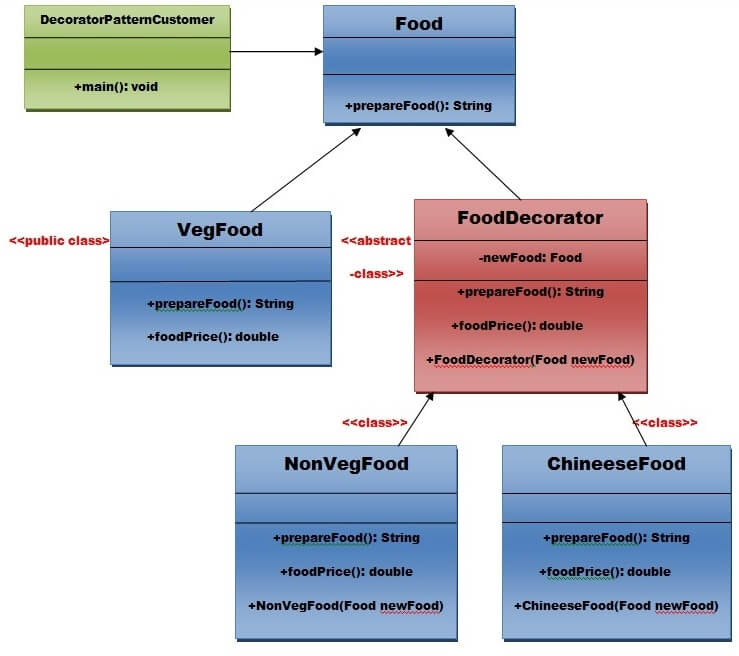
Step 1:Create a Food interface.
public interface Food {
public String prepareFood();
publicdoublefoodPrice();
}// End of the Food interface.
Step 2: Create a VegFood class that will implements the Food interface and override its all methods.
public class VegFood implements Food {
public String prepareFood() {
return “Veg Food”;
}
publicdoublefoodPrice() {
return50.0;
}
}
Step 3:Create a FoodDecorator abstract class that will implements the Food interface and override it’s all methods and it has the ability to decorate some more foods.
public abstract class FoodDecorator implements Food {
privateFood newFood;
public FoodDecorator(Food newFood) {
this.newFood = newFood;
}
@Override
public String prepareFood() {
return newFood.prepareFood();
}
publicdoublefoodPrice() {
return newFood.foodPrice();
}
}
Step 4:Create a NonVegFood concrete class that will extend the FoodDecorator class and override it’s all methods.
public class NonVegFood extends FoodDecorator {
public NonVegFood(Food newFood) {
super(newFood);
}
public String prepareFood() {
return super.prepareFood() + ” With Roasted Chiken and Chiken Curry “;
}
publicdoublefoodPrice() {
return super.foodPrice() + 150.0;
}
}
Step 5:Create a ChineeseFood concrete class that will extend the FoodDecorator class and override it’s all methods.
public class ChineeseFood extends FoodDecorator {
public ChineeseFood(Food newFood) {
super(newFood);
}
public String prepareFood() {
return super.prepareFood() + ” With Fried Rice and Manchurian “;
}
publicdoublefoodPrice() {
return super.foodPrice() + 65.0;
}
}
Step 6:Create a DecoratorPatternCustomer class that will use Food interface to use which type of food customer wants means (Decorates).
import java.io.BufferedReader;
import java.io.IOException;
import java.io.InputStreamReader;
public class DecoratorPatternCustomer {
privatestaticintchoice;
public static void main(String args[]) throws NumberFormatException, IOException {
do {
System.out.print(“========= Food Menu ============ \n”);
System.out.print(“ 1. Vegetarian Food. \n”);
System.out.print(“ 2. Non-Vegetarian Food.\n”);
System.out.print(“ 3. Chineese Food. \n”);
System.out.print(“ 4. Exit \n”);
System.out.print(“Enter your choice: “);
BufferedReader br = new BufferedReader(new InputStreamReader(System.in));
choice = Integer.parseInt(br.readLine());
switch(choice) {
case 1: {
VegFood vf = new VegFood();
System.out.println(vf.prepareFood());
System.out.println(vf.foodPrice());
}
break;
case 2: {
Food f1 = new NonVegFood((Food) new VegFood());
System.out.println(f1.prepareFood());
System.out.println(f1.foodPrice());
}
break;
case 3: {
Food f2 = new ChineeseFood((Food) new VegFood());
System.out.println(f2.prepareFood());
System.out.println(f2.foodPrice());
}
break;
default: {
System.out.println(“Other than these no food available”);
}
return;
}// end of switch
} while (choice != 4);
}
}
Output
========= Food Menu ============
1. Vegetarian Food.
2. Non–Vegetarian Food.
3. Chineese Food.
4. Exit
Enter your choice: 1
Veg Food
50.0
========= Food Menu ============
1. Vegetarian Food.
2. Non–Vegetarian Food.
3. Chineese Food.
4. Exit
Enter your choice: 2
Veg Food With Roasted Chiken and Chiken Curry
200.0
========= Food Menu ============
1. Vegetarian Food.
2. Non–Vegetarian Food.
3. Chineese Food.
4. Exit
Enter your choice: 3
Veg Food With Fried Rice and Manchurian
115.0
========= Food Menu ============
1. Vegetarian Food.
2. Non–Vegetarian Food.
3. Chineese Food.
4. Exit
Enter your choice: 4
Other than these no food available
