Composite Pattern
Composite Pattern
A Composite Pattern says that just “allow clients to operate in generic manner on objects that may or may not represent a hierarchy of objects”.
Advantage of Composite Design Pattern
- It defines class hierarchies that contain primitive and complex objects.
- It makes easier to you to add new kinds of components.
- It provides flexibility of structure with manageable class or interface.
Usage of Composite Pattern
It is used:
- When you want to represent a full or partial hierarchy of objects.
- When the responsibilities are needed to be added dynamically to the individual objects without affecting other objects. Where the responsibility of object may vary from time to time.
UML for Composite Pattern
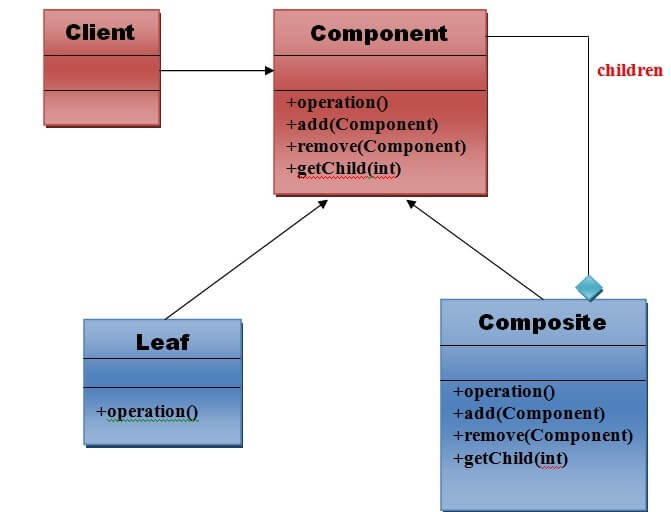
Elements used in Composite Pattern:
Let’s see the 4 elements of composi
1) Component
- Declares interface for objects in composition.
- Implements default behavior for the interface common to all classes as appropriate.
- Declares an interface for accessing and managing its child components.
2) Leaf
- Represents leaf objects in composition. A leaf has no children.
- Defines behavior for primitive objects in the composition.
3) Composite
- Defines behavior for components having children.
- Stores child component.
- Implements child related operations in the component interface.
4) Client
- Manipulates objects in the composition through the component interface.
Note:The work flow of above general UML is as follows.
Client uses the component class interface to interact with objects in the composition structure. If recipient is the leaf then request will be handled directly. If recipient is a composite, then it usually forwards the request to its child for performing the additional operations.
Example of Composite Pattern
We can easily understand the example of composite design pattern by the UML diagram given below:
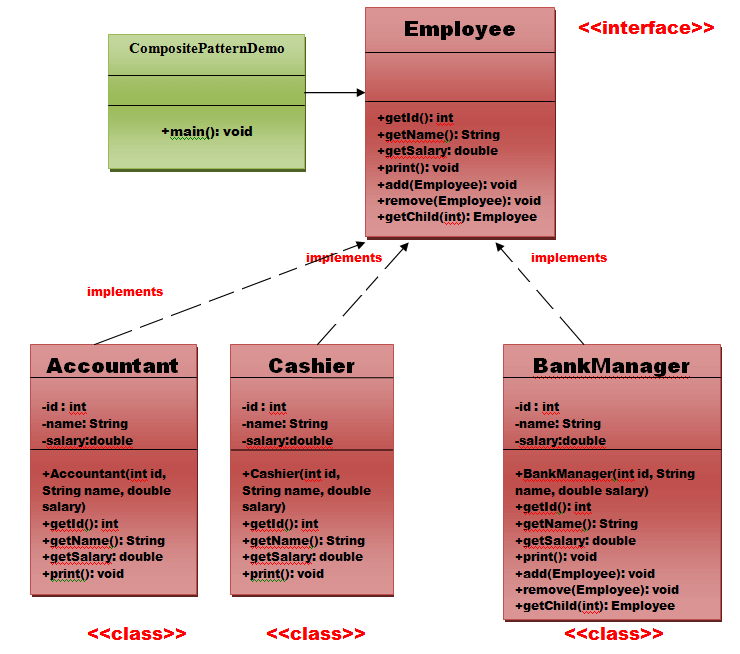
Implementation of above UML:
Step 1
Create an Employee interface that will be treated as a component.
// this is the Employee interface i.e. Component.
public interface Employee {
public intgetId();
public String getName();
public double getSalary();
public void print();
public void add(Employee employee);
public void remove(Employee employee);
public Employee getChild(int i);
}// End of the Employee interface.
Step 2
Create a BankManager class that will be treated as a Composite and implements Employee interface.
// this is the BankManager class i.e. Composite.
import java.util.ArrayList;
import java.util.Iterator;
import java.util.List;
public class BankManager implements Employee {
privateintid;
privateString name;
privatedoublesalary;
publicBankManager(int id, String name, double salary) {
this.id = id;
this.name = name;
this.salary = salary;
}
List<Employee> employees = new ArrayList<Employee>();
@Override
publicvoidadd(Employee employee) {
employees.add(employee);
}
@Override
publicEmployee getChild(int i) {
return employees.get(i);
}
@Override
publicvoidremove(Employee employee) {
employees.remove(employee);
}
@Override
publicintgetId() {
returnid;
}
@Override
public String getName() {
returnname;
}
@Override
publicdoublegetSalary() {
returnsalary;
}
@Override
publicvoidprint() {
System.out.println(“==========================”);
System.out.println(“Id =” + getId());
System.out.println(“Name =” + getName());
System.out.println(“Salary =” + getSalary());
System.out.println(“==========================”);
Iterator<Employee> it = employees.iterator();
while (it.hasNext()) {
Employee employee = it.next();
employee.print();
}
}
}// End of the BankManager class.
Step 3
Create a Cashier class that will be treated as a leaf and it will implement to the Employee interface.
public class Cashier implements Employee{
/*
In this class,there are many methods which are not applicable to cashier because
it is a leaf node.
*/
private int id;
private String name;
private double salary;
public Cashier(int id,String name,double salary) {
this.id=id;
this.name = name;
this.salary = salary;
}
@Override
public void add(Employee employee) {
//this is leaf node so this method is not applicable to this class.
}
@Override
public Employee getChild(int i) {
//this is leaf node so this method is not applicable to this class.
return null;
}
@Override
public int getId() {
// TODO Auto-generated method stub
return id;
}
@Override
public String getName() {
return name;
}
@Override
public double getSalary() {
return salary;
}
@Override
public void print() {
System.out.println(“==========================”);
System.out.println(“Id =”+getId());
System.out.println(“Name =”+getName());
System.out.println(“Salary =”+getSalary());
System.out.println(“==========================”);
}
@Override
public void remove(Employee employee) {
//this is leaf node so this method is not applicable to this class.
}
}
Step 4
Create a Accountant class that will also be treated as a leaf and it will implement to the Employee interface.
public class Accountant implements Employee {
/*
* In this class,there are many methods which are not applicable to cashier
* because it is a leaf node.
*/
privateintid;
privateString name;
privatedoublesalary;
publicAccountant(int id, String name, double salary) {
this.id = id;
this.name = name;
this.salary = salary;
}
@Override
publicvoidadd(Employee employee) {
// this is leaf node so this method is not applicable to this class.
}
@Override
publicEmployee getChild(int i) {
// this is leaf node so this method is not applicable to this class.
returnnull;
}
@Override
publicintgetId() {
// TODO Auto-generated method stub
returnid;
}
@Override
public String getName() {
returnname;
}
@Override
publicdoublegetSalary() {
returnsalary;
}
@Override
publicvoidprint() {
System.out.println(“=========================”);
System.out.println(“Id =” + getId());
System.out.println(“Name =” + getName());
System.out.println(“Salary =” + getSalary());
System.out.println(“=========================”);
}
@Override
publicvoidremove(Employee employee) {
// this is leaf node so this method is not applicable to this class.
}
}
Step 5
Create a CompositePatternDemo class that will also be treated as a Client and ii will use the Employee interface.
public class CompositePatternDemo {
publicstaticvoidmain(String args[]) {
Employee emp1 = new Cashier(101, “Deepak Bhardwaj”, 20000.0);
Employee emp2 = new Cashier(102, “Garv Tiwari”, 25000.0);
Employee emp3 = new Accountant(103, “Kuhu Bhardwaj”, 30000.0);
Employee manager1 = new BankManager(100, “Nishant Bhardwaj”, 100000.0);
manager1.add(emp1);
manager1.add(emp2);
manager1.add(emp3);
manager1.print();
}
}
Output
- ==========================
- Id =100
- Name =Deepak Bhardwaj
- Salary =100000.0
- ==========================
- ==========================
- Id =101
- Name =Garv Tiwari
- Salary =20000.0
- ==========================
- ==========================
- Id =102
- Name =Kuhu Bhardwaj
- Salary =25000.0
- ==========================
- =========================
- Id =103
- Name =Nishant Bhardwaj
- Salary =30000.0
- =========================

